
A day’s work for me involves device hopping. One moment, I am working on my laptop in my office. Another hour later, I am using my smartphone/iPad while having a meeting over coffee in a mall.
I guess this applies to not just me but many others in Singapore as hybrid work is more or less the norm.
The problem is that most productivity tools were built for a single-screen world. Sync lags cost time and formatting runs is common when a file moves between devices. The workflow friction can be a pain.
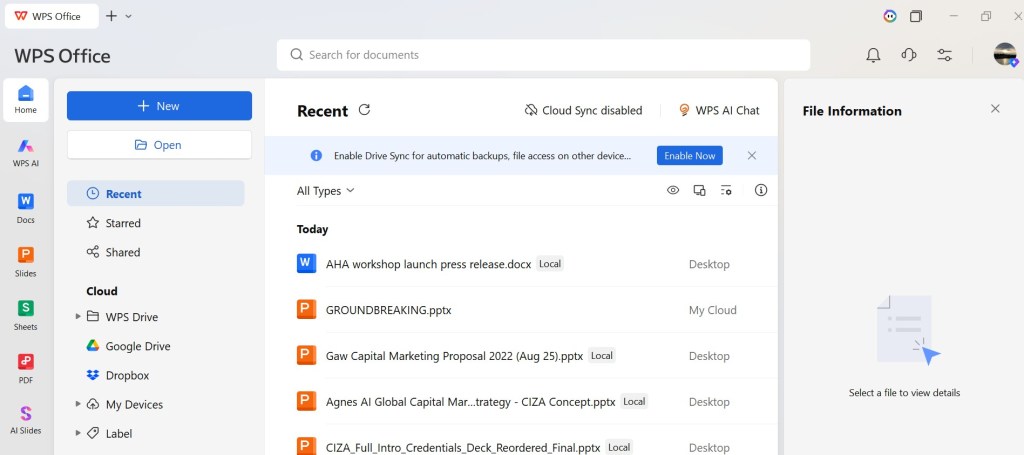
This is exactly the painpoint WPS Office is built to address. No longer just a legacy office suite from Kingsoft (38 years in the game and 600 million monthly active users worldwide), it is repositioned as an AI-powered productivity platform engineered from the ground up for today’s hybrid reality.
WPS Office features one login, one clean interface, working natively across Windows, Mac, Android, iOS, iPadOS, and the web. AI assistance is baked directly into every document type, not tucked away in a separate app.
I tested it this week and here’s what worked, what could have been better, and who I feel would benefit most from it.
Why WPS Office deserves a spot on the home screen
1. Cross-device sync that works
This was my biggest pleasant surprise. I created a presentaion on my Android phone and it was instantly sync to my laptop. The file is saved in pptx format too for easy viewing or editing on other tools. No more formatting nightmares! For hybrid workers bouncing between screens, this continuity alone is worth the switch.

2. AI lives inside your workflow
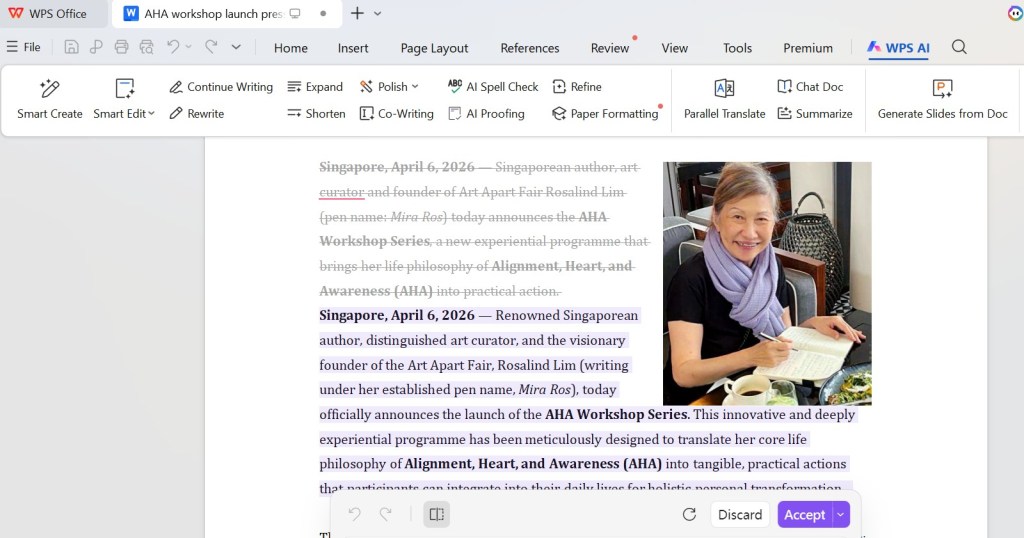
Unlike most other AI tools that force me to leave my document, paste text into a browser, wait, then paste back, WPS AI sits inside Writer, Slides, Sheets, and PDF. I tested on expanding a press release and the AI works quickly. Eveything is done inside the app. No more toggling between productivity tools and AI apps.
3. Fast installation and file opening
WPS installs in under two minutes and launches in under two seconds. File compatibility is excellent: .docx, .xlsx, .pptx, and standard PDFs all open, edit, and save cleanly. No fuss installation and file opening.
4. One app replaces five
Most of us run a word processor, spreadsheet app, presentation tool, PDF reader/editor, and a separate AI assistant. WPS places all into one unified dashboard: Writer, Spreadsheets, Presentation, a full PDF toolkit (merge, split, sign, OCR), plus AI writing, translation and analysis. The interface is clean, touch-friendly on mobile, and keeps every recent file, regardless of format, in one searchable place. Less app fatigue, fewer notifications, lower mental load.

5. Great value
The free tier is genuinely useful with full editing, basic AI, 1GB cloud, and all core tools. The Pro+ plan removes ads, unlocks advanced AI, 20GB storage, batch PDF processing, and priority support for US$69.99 per year (US$5.83 per month).
Standard limitation
I was provided with the Pro+ version which comes with all the features but the free standard tier comes with pop-up ads, which can be distracting.
Recommendation
WPS Office is a useful and affordable alternative to Microsoft Office (sans Outlook). It is ideal for those who work on multiple devices daily, as well as those who are tired of toggling between standalone AI tools and their documents.
Verdict
WPS Office isn’t trying to beat Microsoft at its own enterprise game. What it does is solve the pain of too many apps, too much switching and too much friction. If you have ever thought “I wish I could just do all of this in one place,” give WPS a week. You may not want to go back.
 Entelechy Asia